Light Painting Photoshop Brushes
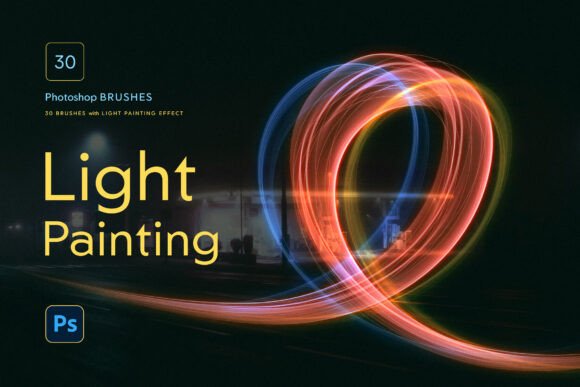
Adding light effects to your digital artwork or photos can completely transform the mood and visual impact of your design. With the Light Painting Photoshop Brushes set, you don’t need advanced skills or hours of editing to create vibrant, glowing strokes. This set of 30 high-quality brushes makes it easy to simulate real light painting techniques directly in Photoshop, giving your projects a dynamic and eye-catching edge.
What Are Light Painting Photoshop Brushes?
These brushes are specially designed tools for Adobe Photoshop that mimic the effect of light painting — a long-exposure photography technique where light sources are moved during a long shutter speed to create glowing trails. Instead of needing a camera and dark environment, you can now create the same results digitally with just a few clicks.
Each brush in the set is pressure-sensitive, so if you use a drawing tablet, you can control the intensity and thickness of your strokes based on how hard you press. Even if you don’t have a tablet, you can still use a mouse or the Stroke Path function to create smooth, glowing lines with precision.
Why This Brush Set Stands Out
One of the most valuable features of the Light Painting Photoshop Brushes is the included set of custom glowing layer styles. These styles apply vibrant, radiant glows automatically, so you don’t have to manually adjust blending modes, opacity, or outer glows. Just select a brush, paint your design, and then apply the style — and your glowing effect is instantly ready.
Whether you're creating digital art, designing posters, or enhancing photos with light overlays, this brush set streamlines the process and saves you time. You’ll find yourself experimenting more freely, trying out different color combinations and lighting effects without the hassle of complex settings.
Who Can Benefit From These Brushes?
- Digital artists who want to add luminous, magical elements to their illustrations.
- Graphic designers looking to create modern, glowing text or background effects for posters, logos, or social media visuals.
- Photographers who want to enhance their images with light trails or dreamy overlays without long post-processing sessions.
- Beginners who want to explore creative effects without a steep learning curve.
Real-World Uses for Light Painting Photoshop Brushes
You might be wondering how you can actually use these brushes in your own work. Here are a few practical examples:
- Poster Design – Add glowing accents around text or images to make your poster pop. Think of a music event flyer with neon light trails swirling around the headline.
- Photo Editing – Use light brushes to highlight specific parts of a photo, like a subject’s face or a product detail, giving it a soft glow that draws attention.
- Concept Art – Digital illustrators can use these brushes to simulate glowing energy, magical effects, or futuristic lighting in their scenes.
- Social Media Graphics – Create standout thumbnails or Instagram stories with glowing borders, animated-like strokes, or light leak overlays.
Getting Started: What You Need to Know
Before diving in, it’s good to understand a few basics about using the Light Painting Photoshop Brushes:
- Compatibility – These brushes work with Photoshop CC and later versions. If you're using an older version, check if it supports .abr brush files.
- Installation – The set comes with easy-to-follow instructions for installing the brushes and layer styles. It’s a simple drag-and-drop process, and you’ll be up and running in minutes.
- Brush Behavior – Many brushes respond to pressure sensitivity if you're using a drawing tablet. If you're using a mouse, you can still get great results by using the Stroke Path function to guide your brush along a path.
How to Make the Most of Your Light Painting Brushes
Here are a few tips to help you get creative and professional results:
- Experiment with Colors – Don’t limit yourself to white light. Try different colors to match your project’s theme. Blues and purples can create a futuristic look, while warm oranges and pinks can simulate fire or sunset glows.
- Layer Effects for Depth – Combine multiple light strokes on different layers to build depth and dimension. You can also adjust the blending mode (like Screen or Overlay) for different effects.
- Use Layer Styles for Instant Glows – The included .asl files let you apply pre-configured glowing effects with a single click. This is especially useful if you're short on time or new to Photoshop effects.
Is This the Right Tool for You?
If you're someone who wants to quickly add glowing, light-painted effects to your designs, the Light Painting Photoshop Brushes could be a game-changer. Whether you’re a beginner looking to explore digital art or a professional designer wanting to speed up your workflow, this set offers flexibility and quality without the learning curve of complex lighting techniques.
However, if you're looking for highly customizable or ultra-realistic light effects from scratch, you might want to combine these brushes with manual adjustments or explore more advanced tools. But for most users, especially those looking for a quick and beautiful result, this brush set delivers excellent value.
Final Thoughts
With the Light Painting Photoshop Brushes, you gain access to a powerful, easy-to-use toolkit that opens up a world of creative possibilities. Whether you're designing for fun, personal projects, or client work, these brushes help you create stunning glowing effects in seconds. No more guessing which settings to tweak or how to layer glows — just pick a brush, apply a style, and bring your vision to life with light.