32 Splatter Ink Photoshop Brushes – A Creative Tool Done Right
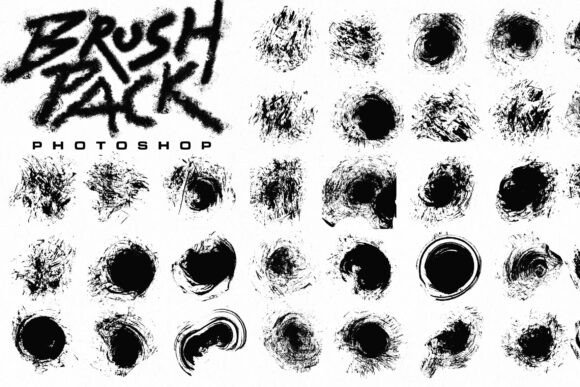
When it comes to digital design, texture and depth can make or break a project. That’s where the 32 Splatter Ink Photoshop Brushes come in—offering a collection of high-resolution, realistic ink splatters that can elevate your work. Whether you're a graphic designer, illustrator, or hobbyist, these brushes can help add a tactile, organic feel to your digital creations. But like any tool, how you use them—and how well you understand them—can determine the results you get.
What Makes These Brushes Unique?
The 32 Splatter Ink Photoshop Brushes package includes a total of 32 distinct splatter shapes, each crafted at a high resolution of 2500 x 2500 pixels. Designed as .abr files, they integrate seamlessly into Adobe Photoshop, making them accessible for both beginners and experienced users. The variety of shapes allows for creative layering and customization, giving designers the flexibility to achieve anything from subtle texture to dramatic ink effects.
Common Mistakes People Make With Splatter Brushes
While these brushes are powerful, there are a few common pitfalls users fall into that can limit their effectiveness or even lead to frustration.
1. Assuming All Splatter Brushes Are the Same
One of the most common misconceptions is that all ink splatter brushes are interchangeable. In reality, quality, resolution, and design can vary significantly. Lower-quality brushes may appear pixelated or repetitive, which can detract from your final image. The 32 Splatter Ink Photoshop Brushes stand out because each shape is unique and high-resolution, reducing the risk of visible repetition.
2. Not Checking Compatibility Before Downloading
Some Photoshop brushes are designed for older versions of the software or require specific settings to work properly. Always verify that the brush set is compatible with your version of Photoshop before downloading. The 32 Splatter Ink Photoshop Brushes are designed to work across recent versions and are easy to install—just load the .abr file and you're ready to go.
3. Overusing the Same Brush
It's easy to fall into the habit of using one or two favorite brushes repeatedly, especially when you're in a rush. But doing so can make your designs look flat or artificial. The full set of 32 Splatter Ink Photoshop Brushes is meant to be mixed and layered. Try combining different splatter shapes and adjusting opacity and blending modes to create more natural, dynamic effects.
4. Ignoring Brush Settings
Many users simply select a brush and start painting without adjusting the settings. Photoshop offers a wide range of customization options—like scattering, size jitter, and transfer—to help you control how the brush behaves. For example, adjusting the Scatter setting can help spread out the splatter for a more organic look, while lowering the Opacity lets you build up texture gradually.
What to Check Before Buying or Using Splatter Brushes
Before downloading or purchasing any brush set—including the 32 Splatter Ink Photoshop Brushes—consider the following factors to ensure you're making a smart, effective choice:
- Resolution: Look for brushes that are at least 2500 x 2500 pixels to maintain quality at larger sizes.
- Format: Confirm the brushes are in .abr format, which is native to Photoshop and easy to load.
- Uniqueness: Avoid sets that reuse the same base image with minor variations. Each brush in the 32 Splatter Ink Photoshop Brushes is a unique splatter shape.
- Support and Documentation: Some brush sets come with tutorials or usage tips. While not always necessary, these can be helpful for new users.
How to Use These Brushes Effectively
Here are a few practical tips to get the most out of the 32 Splatter Ink Photoshop Brushes:
- Start with a new layer: Always paint on a separate layer so you can adjust or remove the effect without affecting your base design.
- Experiment with blending modes: Try using the brushes with blending modes like Multiply, Overlay, or Soft Light to integrate the ink texture more naturally into your design.
- Vary brush size and rotation: Use the Brush Panel to adjust size and rotation dynamically for a more organic appearance.
- Use layer masks: Instead of erasing parts of the splatter, use layer masks to hide or reveal areas non-destructively.
Real-World Applications
These brushes aren’t just for digital artists. They can be used in a variety of creative fields:
- Graphic Design: Add texture to posters, flyers, and branding materials.
- Photography: Blend ink textures with photos for artistic effects or vintage overlays.
- Marketing: Create engaging social media visuals or promotional banners with a handcrafted look.
- Educational Content: Teachers and bloggers can use these brushes to make digital handouts or presentations more visually appealing.
Final Thoughts
The 32 Splatter Ink Photoshop Brushes offer a versatile and high-quality solution for anyone looking to add organic texture to their digital work. While they’re easy to use, taking a little extra time to understand their features and avoid common mistakes can make a big difference in your final output. Whether you're a seasoned professional or just starting out, these brushes can help you achieve more expressive, dynamic designs with minimal effort.
Remember, the key to getting the most out of any brush set is experimentation. Don’t be afraid to mix, layer, and adjust until you find the look that works best for your project. With the 32 Splatter Ink Photoshop Brushes, you’re not just getting a tool—you’re gaining a creative companion that can help bring your ideas to life.