60 Watercolor Brushes for Photoshop: Creative Freedom for Digital Artists and Designers
If you’ve ever wanted to bring the soft, flowing textures of watercolor into your digital work without picking up a real brush, the 60 Watercolor Brushes for Photoshop set is a powerful tool to have in your creative arsenal. This downloadable brush pack gives digital artists, designers, educators, and small business owners an easy way to add painterly effects to their projects—all within Adobe Photoshop.
What Exactly Are These Watercolor Brushes?
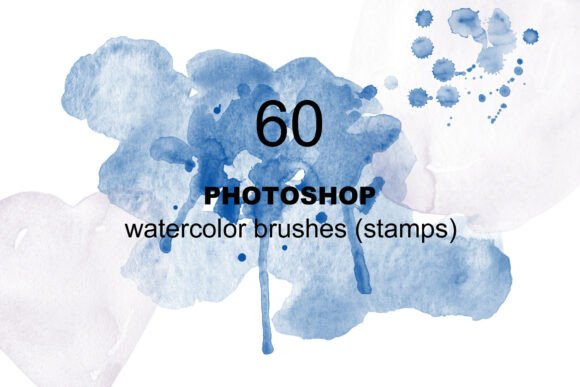
The 60 Watercolor Brushes for Photoshop is a downloadable ABR file containing 60 unique watercolor brush stamps. Each brush mimics the organic, flowing look of real watercolor—splatters, blots, washes, and textured strokes. The pack also includes a PDF with simple installation instructions, making it accessible even for those who aren’t tech-savvy.
These brushes aren’t just for illustrators. Whether you’re designing a wedding invitation, creating digital art for social media, or working on a personal scrapbook layout, this set gives you the flexibility to add hand-painted charm with just a few clicks.
Where and Why People Use Watercolor Brushes in Photoshop
Many digital creators use Photoshop not just for photo editing, but for crafting visuals that feel personal and artistic. Watercolor brushes help bridge the gap between digital precision and organic, hand-drawn aesthetics. Here are a few real-world scenarios where these brushes come in handy:
- Wedding and Event Designers use watercolor textures to create soft, romantic backdrops for invitations and thank-you cards.
- Bloggers and Social Media Managers enhance their visual branding by incorporating hand-painted elements into graphics and quote images.
- Teachers and Educators design engaging, colorful worksheets and classroom visuals that feel more approachable than standard clip art.
- Freelance Artists add depth and texture to digital illustrations, making them look more like traditional paintings.
- Small Business Owners use these brushes to craft product mockups, packaging concepts, or website banners that stand out with a personal touch.
Customization: Why It Matters
One of the biggest advantages of using the 60 Watercolor Brushes for Photoshop is how easy they are to customize. Unlike static images or clip art, these brushes can be resized, recolored, layered, and blended to suit your specific project. For example, a designer working on a vintage-style logo might use a watercolor brush to create a soft background wash, then adjust the opacity and color to match the brand palette.
Even if you're not a digital art expert, you can experiment with layer modes like Multiply or Overlay to create different effects. This flexibility makes the brush set valuable not just for pros, but for hobbyists and beginners looking to grow their Photoshop skills.
Real-World Examples of How People Use These Brushes
Let’s take a closer look at how different users apply these brushes in practical ways:
- Creating Invitation Designs: A small business owner who designs digital wedding invitations uses the watercolor brushes to add soft floral backgrounds. She layers a few different brushes, adjusts the colors to match the couple’s theme, and adds a personal, hand-painted feel without needing to paint anything manually.
- Designing a Personal Blog: A lifestyle blogger uses the brushes to create custom dividers and background textures for her blog posts. The result is a visually cohesive site that feels more curated and expressive than if she’d used standard design elements.
- Teaching Kids’ Art Classes Online: An educator creates downloadable art activity sheets using watercolor textures to simulate the look of real watercolor paper. The textures help students visualize how paint might behave on real surfaces, even though they’re working digitally.
- Mocking Up Product Packaging: A product designer uses the brushes to simulate hand-painted labels for a line of organic skincare products. The watercolor effects help the mockups feel more artisanal and authentic.
What to Consider Before Using These Brushes
While the 60 Watercolor Brushes for Photoshop offer a lot of creative potential, it’s important to understand a few key points before diving in:
- Compatibility: Make sure you're using a version of Photoshop that supports ABR brush files. Most modern versions do, but it’s worth double-checking if you're on an older version or using a mobile app.
- Learning Curve: If you're new to Photoshop, you may need to spend a little time learning how to load and adjust brushes. The included PDF helps with installation, but understanding brush dynamics like flow, opacity, and scattering can take your results to the next level.
- Usage Rights: Always check the licensing terms included with the brush set. Most commercial brush sets allow personal and small business use, but if you're planning to use them in a product for resale or distribution, confirm the permissions first.
- File Size and Performance: Some high-resolution brushes can slow down Photoshop, especially on older machines. These brushes are optimized for performance, but it's still a good idea to test them on a sample project before going all-in.
Getting the Most Out of Your Watercolor Brushes
Once you’ve installed the brushes, don’t be afraid to experiment. Try using them in combination with other Photoshop tools like layer masks, adjustment layers, and blending modes. For example, you can use a watercolor brush as a mask to reveal parts of a photo in a soft, painterly way.
You can also combine multiple brushes to build complex textures. One designer we spoke with layers several watercolor brushes to create a faux-painting effect for digital greeting cards. She then exports them as transparent PNGs to reuse in other projects—turning a single brush set into a reusable design toolkit.
Final Thoughts
The 60 Watercolor Brushes for Photoshop isn’t just another brush pack—it’s a creative tool that opens up new possibilities for digital expression. Whether you're a seasoned designer or just starting out, this set gives you the flexibility to add hand-crafted charm to your digital work without needing to touch a real paintbrush.
From invitations and digital art to branding and educational materials, the applications are endless. And with easy installation and customization, it’s a smart investment for anyone looking to elevate their Photoshop projects with a touch of watercolor magic.