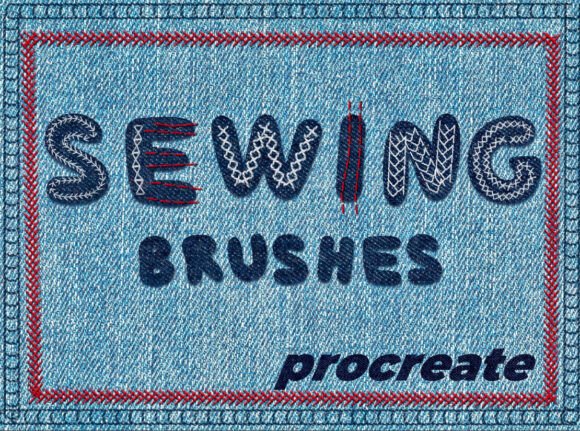
Sewing Brushes for Procreate: Digital Embroidery Made Simple
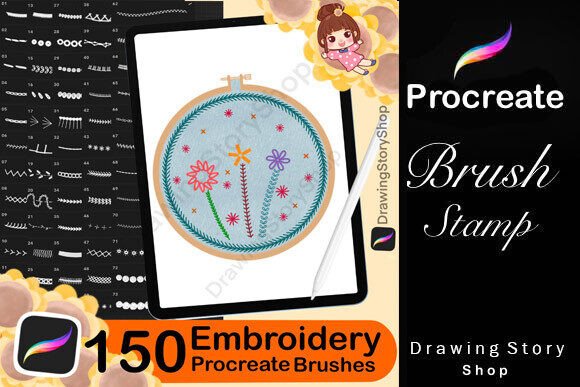
For digital artists and designers who work within the Procreate app, the Sewing Brushes - Procreate set offers a unique way to incorporate embroidery-style elements into their work. This brush pack includes 16 hand-drawn stitches and 5 texture brushes, giving creators the tools to simulate hand-stitched details, fabric textures, and embroidered designs directly on their iPad. Whether you're building an illustration from scratch or enhancing an existing image with subtle stitch details, this brush set allows for creative flexibility while maintaining a handcrafted aesthetic.
How Sewing Brushes Fit Into the Creative Workflow
In a broader creative process, digital embroidery brushes like those in the Sewing Brushes - Procreate set serve as a bridge between traditional craft and modern digital illustration. They can be used at multiple stages—during concept development, as part of the main illustration, or even as finishing touches to add depth and realism. For example, a designer working on a textile pattern might use the stitch brushes early in the design phase to simulate how a real embroidered version would look. Alternatively, an illustrator might apply stitch marks after completing a character design to give clothing or accessories a more tactile appearance.
Use Cases Across Different Creative Tasks
- Concept Design: Test how embroidered elements might translate into physical products before production.
- Illustration: Add dimension and detail to clothing, accessories, or decorative elements in character or scene design.
- Mockups: Use the texture brushes to enhance fabric mockups for branding, packaging, or product visualization.
- Personal Projects: Create digital embroidery art that mimics traditional techniques without the physical materials.
Integration with Other Tools and Platforms
The Sewing Brushes - Procreate set works exclusively within the Procreate app, which is widely used by illustrators, designers, and digital artists. Because of this, it integrates seamlessly with other Procreate tools like layers, alpha lock, and blending modes. Users can layer stitch textures over fabric-like backgrounds or use clipping masks to apply embroidery effects to specific parts of an illustration.
These brushes also work well alongside other digital assets such as fabric textures, pattern brushes, and vector elements imported via Procreate’s file compatibility features. For example, a designer might create a base illustration in Procreate, then import the file into Adobe Illustrator for final layout or print preparation. The stitch details from the Sewing Brushes - Procreate set remain high-quality and scalable, making them suitable for both digital and print output.
Compatibility and Usability Considerations
Since the brushes are designed specifically for iPad and the Procreate app, users should ensure they are working with the latest version of Procreate and have sufficient storage space for brush imports. Each brush in the set is hand-drawn, which means they offer a level of organic variation that mimics real-world embroidery—this can be a benefit for those looking to avoid overly mechanical or digital appearances in their work.
For best results, it’s recommended to test each brush at different brush sizes and opacity levels to understand how they behave. Some brushes may work better at smaller scales for fine detail, while others are ideal for broader decorative elements. Keeping a swatch or test page within your Procreate file can help streamline this process and ensure consistency across projects.
Practical Implementation Tips
Here are a few strategies to get the most out of the Sewing Brushes - Procreate set:
- Create a Brush Test Page: Start each new project with a test canvas to explore how each stitch and texture brush behaves under different settings.
- Use Layers for Organization: Keep embroidery elements on separate layers so they can be edited or removed without affecting the base illustration.
- Combine with Other Brushes: Layer stitch brushes with watercolor or fabric texture brushes to build depth and realism.
- Save Custom Settings: If you find a particular brush setting works well, save it as a variation so you can quickly access it in future projects.
- Export Smartly: When exporting your final illustration, ensure the resolution is high enough for your intended use—especially if preparing for print or commercial use.
Workflow Example: Designing a Stamped Fabric Label
Imagine you're designing a custom fabric label for a clothing brand. You want to show how the final product would look with embroidered text and a stitched border. Here’s how the Sewing Brushes - Procreate set can fit into that process:
- Research: Gather reference images of actual embroidered fabric labels to understand how stitches sit on fabric.
- Sketch: Create a rough layout of the label design, including placement of text and any graphic elements.
- Base Design: Use Procreate’s standard brushes to build the fabric texture and background color of the label.
- Apply Stitches: Use the stitch brushes to outline the label and add embroidered text details. Adjust opacity and layer blending modes to simulate thread on fabric.
- Finalize: Review the design for consistency in stitch spacing and overall visual balance. Make adjustments as needed.
- Export: Export the design in multiple formats for client review or production handoff.
Maintaining Efficiency and Consistency
One of the key benefits of using digital embroidery brushes like the Sewing Brushes - Procreate set is the ability to maintain consistency across multiple illustrations or design variations. Once you've established a workflow that works for your project type, you can reuse brush settings, layer structures, and export templates to speed up future work.
It’s also helpful to maintain a consistent color palette, especially if you're simulating specific thread colors. Using Procreate’s color sets or saving custom palettes can ensure that your digital embroidery elements match your brand or design guidelines exactly.
Long-Term Use and Scalability
As your design needs evolve, the Sewing Brushes - Procreate set can grow with you. Whether you're working on a single illustration or building a full product line of embroidered designs, these brushes offer a scalable solution that doesn’t require additional materials or setup beyond your iPad and stylus. They also provide a sustainable alternative to physical embroidery samples, especially during the concept and review stages of a project.
Because digital embroidery brushes are non-destructive and easy to modify, they’re ideal for iterative design processes. You can experiment with different stitch patterns, textures, and layouts without wasting physical resources, making them a valuable tool for both personal and professional use.
Conclusion
The Sewing Brushes - Procreate set is more than just a collection of digital brushes—it’s a practical tool for integrating embroidery-style detail into digital illustration workflows. Whether used for concept development, final illustration, or design presentation, these brushes offer a realistic, flexible, and efficient way to bring a handcrafted touch to digital work. By understanding how to implement them effectively within your creative process, you can enhance your designs with authentic stitch details and textures, all while maintaining the efficiency and flexibility of digital tools.