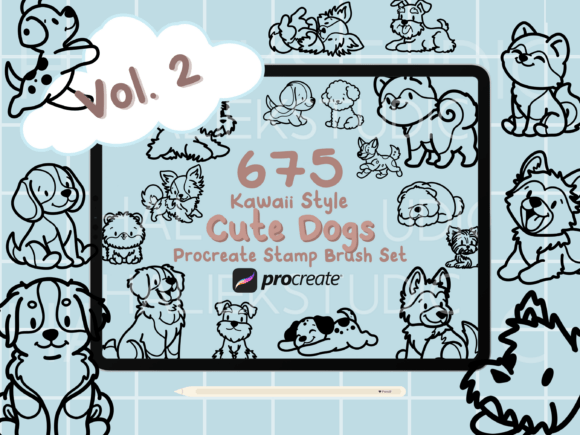
675 Procreate Dog Stamp Brushes Vol. 2 – Enhancing Creative Workflows with Kawaii Dog Illustrations
For digital artists, illustrators, and small business owners working within the Procreate ecosystem, efficiency and consistency are critical to maintaining a productive creative process. 675 Procreate Dog Stamp Brushes Vol. 2 offers a robust solution for integrating high-quality, hand-drawn kawaii dog illustrations directly into your digital workflow. Whether you're designing logos, creating greeting cards, or developing apparel patterns, this brush set simplifies the inclusion of consistent, adorable dog imagery across multiple projects.
Understanding the Scope and Use Cases
The 675 Procreate Dog Stamp Brushes Vol. 2 collection contains a total of 675 unique dog stamps, each illustrated in a cute, kawaii, or chibi style. These stamps represent a wide variety of dog breeds, including Beagles, Chihuahuas, German Shepherds, and Shiba Inus. Each brush is designed as a non-pressure sensitive stamp, making it accessible to users without an Apple Pencil while maintaining usability for those who do.
This brush set is particularly valuable for creators working on repetitive design elements. For example, illustrators developing a children’s book may use the stamps to maintain visual consistency across pages. Similarly, small business owners producing dog-themed merchandise can integrate these stamps into print designs for t-shirts, mugs, or stickers.
Integration into the Creative Workflow
Incorporating 675 Procreate Dog Stamp Brushes Vol. 2 into your creative process begins with understanding how and when to use the stamps for maximum efficiency. The brushes are ideal for use during the drafting or asset creation phase, where visual consistency and speed are essential. Rather than redrawing the same dog illustration multiple times, you can stamp and adjust as needed, saving time and reducing visual inconsistencies.
For example, a digital artist designing a pattern for fabric printing can quickly place multiple dog stamps across a canvas, resize them, and recolor as needed. Because each stamp is vector-like in its scalability, resizing does not compromise image quality. This makes the brushes especially useful in pattern design, where repeated elements must align cleanly and maintain clarity at various scales.
Preparation and Compatibility
Before using the brushes, ensure your Procreate version supports custom brush imports. The set is designed exclusively for Procreate, so it will not function in other digital art platforms. Once installed, the brushes are organized into 15 distinct collections, each representing a specific dog breed. This organization helps streamline access during the creative process, allowing you to locate the right brush quickly.
It's also important to note that these brushes are not pressure-sensitive. This feature makes them accessible to users without an Apple Pencil, such as those using a basic stylus or even their fingers. While pressure sensitivity can enhance brush dynamics, the trade-off here is broader usability and consistent output across different input methods.
Workflow Efficiency and Consistency
One of the primary benefits of using 675 Procreate Dog Stamp Brushes Vol. 2 is the ability to maintain visual consistency across multiple design elements. When designing a product line featuring dog illustrations—such as pet-themed stationery or apparel—it's essential that the same dog style appears uniform across all items. Stamps ensure that each instance of a dog illustration is identical in shape, line weight, and detail, reducing the need for manual adjustments.
Additionally, because the brushes are pre-drawn, they eliminate the need for sketching from scratch. This is especially useful for creators who may not have strong illustration skills but still want to include high-quality dog art in their work. By using the stamps as base assets, you can focus more on layout, color, and composition rather than drawing each character manually.
Combining with Other Tools and Resources
The 675 Procreate Dog Stamp Brushes Vol. 2 works well alongside other design tools and resources. For instance, if you're creating a digital product such as a printable dog-themed planner, you can use the stamps in Procreate and then export the pages to Canva or Adobe Illustrator for final formatting and print preparation. This cross-platform compatibility enhances the versatility of the brushes beyond Procreate alone.
For those who also use design asset platforms like Creative Market or Etsy, the brushes can be integrated into larger design kits. You might combine these dog stamps with floral borders, kawaii food stamps, or background textures to create a themed design bundle for resale (as long as redistribution of the brushes themselves is not included).
Long-Term Use and Organization
To get the most out of this brush set over time, proper organization within Procreate is essential. Consider creating a dedicated brush group labeled “Kawaii Dog Stamps” and subfolders for each breed. This structure allows for faster access and easier navigation, especially when working on complex projects with multiple design elements.
As your library of custom brushes grows, maintaining a clean and logical folder system prevents clutter and enhances workflow efficiency. You might also consider creating a reference sheet within Procreate that displays all the available dog stamps, making it easier to preview options before inserting them into a live project.
Quality Control and Customization
Each stamp in the 675 Procreate Dog Stamp Brushes Vol. 2 set is hand-drawn, ensuring a high level of detail and artistic quality. However, you may find it useful to customize individual stamps to better fit your project’s aesthetic. For example, you can recolor the stamps using Procreate’s adjustment tools or add shading and highlights to give the illustrations more depth.
Customization should be approached with care to maintain consistency across your work. If you're using multiple dog stamps within a single design, ensure that any edits you apply—such as color adjustments or added effects—are uniform across all instances. This attention to detail contributes to a polished, professional final product.
Practical Implementation Tips
- Batch Editing: Use the selection tool to adjust multiple dog stamps at once, such as resizing or recoloring entire groups simultaneously.
- Layer Management: Keep stamps on separate layers from your background or text elements to allow for easy editing and rearrangement.
- Exporting for Use Elsewhere: Export individual stamps as PNGs for use in other design software or platforms like Canva, Illustrator, or Photoshop.
- Creating Repeating Patterns: Use the Transform tool to duplicate and align dog stamps into repeating patterns for backgrounds or textile designs.
Conclusion
The 675 Procreate Dog Stamp Brushes Vol. 2 is more than just a set of cute dog illustrations—it's a practical tool for streamlining digital design workflows. Whether you're a professional illustrator, a small business owner, or a hobbyist creating personalized gifts, this brush set offers a reliable way to integrate high-quality, kawaii-style dog art into your projects. By understanding how to organize, customize, and implement these brushes effectively, you can enhance both the efficiency and visual appeal of your creative output.