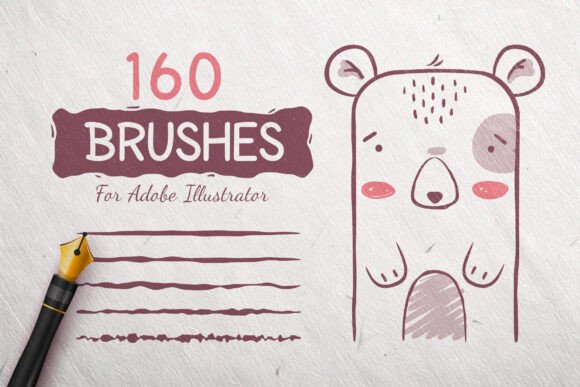
160 Ink Doodle Vector Brushes: A Versatile Toolkit for Digital Artists and Designers
For digital artists, illustrators, and designers seeking to infuse their work with a hand-drawn, organic feel, the 160 Ink Doodle Vector Brushes offer a powerful solution. This expansive collection provides a wide array of vector brushes tailored for Adobe Illustrator, enabling creators to bring cartoonish whimsy, expressive strokes, or intricate details to their projects with ease. Whether you're sketching characters, designing comics, or crafting visual narratives, these brushes can become an essential part of your creative toolkit.
Understanding Vector Brushes in Adobe Illustrator
Vector brushes are scalable, resolution-independent tools used in Adobe Illustrator to simulate hand-drawn effects while maintaining the flexibility of vector graphics. Unlike raster-based brushes, vector brushes retain clarity at any size, making them ideal for both print and digital design. The 160 Ink Doodle Vector Brushes leverage this scalability to give artists a wide range of stylistic options without compromising quality.
Two Main Categories: Stretchable and Stretchless Brushes
This collection is divided into two primary types: stretchable and stretchless brushes. Each serves a distinct purpose in design workflows:
- Stretchable Brushes (100 brushes): These adapt to the length of the stroke, allowing for dynamic lines that maintain their texture and detail regardless of how long or short they are drawn. They are ideal for creating expressive outlines, flowing hair, or animated motion effects.
- Stretchless Brushes (60 brushes): These maintain a fixed width and pattern, making them suitable for textures, fills, or consistent decorative elements like borders, dots, or speckles. They’re especially useful for adding fine details without distortion.
Key Features That Enhance Creativity
The 160 Ink Doodle Vector Brushes are not just a quantity-over-quality offering. Each brush is precision-crafted to ensure smooth application and natural-looking strokes. Here are some standout features that make this set a valuable asset:
Versatility Across Artistic Styles
From playful squiggles to bold ink strokes, this brush pack accommodates a broad spectrum of artistic styles. Cartoonists can use them to sketch exaggerated expressions, while illustrators may find them useful for adding hand-drawn textures to digital paintings. The diversity ensures that whether your work leans toward the whimsical or the refined, there’s a brush to match your vision.
High-Quality, Scalable Output
Since these brushes are vector-based, they maintain their clarity and sharpness at any scale. This makes them ideal for both small-scale illustrations and large-format prints. Designers working on merchandise, packaging, or web graphics can confidently use these brushes without worrying about pixelation or loss of detail.
Intuitive Integration with Adobe Illustrator
The brushes are designed to work seamlessly within Adobe Illustrator CC2014 and newer versions. Users can apply them directly to paths, adjust stroke widths, and customize brush settings with ease. The included documentation and preview files make the learning curve gentle, even for those new to vector brushes.
Practical Applications Across Creative Fields
The 160 Ink Doodle Vector Brushes cater to a wide range of creative professionals and hobbyists. Here’s how different users can integrate them into their workflows:
For Cartoonists and Comic Book Artists
These brushes are particularly well-suited for creating expressive character designs, dynamic panel layouts, and textured backgrounds. The stretchable brushes allow for fluid inking lines, while the stretchless ones can be used to add stippling, crosshatching, or other effects that give depth to comic art.
For Illustrators and Digital Painters
Illustrators often seek ways to blend digital precision with a handcrafted aesthetic. These brushes help bridge that gap by allowing for organic strokes that mimic traditional ink or pen work. They can be layered over digital paintings to add texture or used as standalone elements in vector illustrations.
For Graphic Designers and Educators
Graphic designers can use these brushes to add personality to branding materials, infographics, or website illustrations. Educators and content creators may find them useful for developing engaging visual aids, hand-drawn diagrams, or custom icons that resonate more deeply with audiences.
For Hobbyists and DIY Creators
Even those who aren’t professional artists can benefit from the accessibility of these brushes. Whether designing greeting cards, personal journals, or social media graphics, the 160 Ink Doodle Vector Brushes offer a way to add a personal, hand-drawn touch without requiring advanced illustration skills.
Getting Started with the Brush Collection
Using the 160 Ink Doodle Vector Brushes is straightforward. The package includes AI and JPG preview files, a video tutorial, and documentation to help users install and apply the brushes effectively. Here’s a quick guide to integrating them into your workflow:
- Installation: Load the brushes into Adobe Illustrator via the Brushes panel. The documentation walks you through this step-by-step.
- Experimentation: Try applying different brushes to basic paths to see how they behave. Adjust stroke width and direction to see how the brushes respond.
- Customization: Illustrator allows for brush customization. You can tweak settings like colorization, scaling, and spacing to suit your specific needs.
- Layering: Combine multiple brushes to create complex textures or outlines. For example, use a stretchable brush for the main line and a stretchless brush for texture overlays.
Maximizing the Value of the Brush Set
While the brushes are powerful on their own, their real value emerges when used thoughtfully within a broader design strategy. Here are some best practices to consider:
Use Them as a Foundation, Not a Crutch
The 160 Ink Doodle Vector Brushes should enhance your existing style, not replace it. Use them to speed up repetitive tasks or add texture, but continue developing your own artistic voice and technique.
Combine with Other Tools and Effects
Pair these brushes with Illustrator’s other features like gradients, clipping masks, or blending modes to create richer compositions. For instance, applying a subtle gradient over a brush-stroked background can add depth and dimension.
Adapt for Different Output Formats
Whether you're designing for print, web, or mobile, these brushes scale well across mediums. Just be mindful of file size and output resolution when exporting for different platforms.
Considerations and Limitations
While the 160 Ink Doodle Vector Brushes are a robust resource, it’s important to understand their scope and limitations:
- Software Compatibility: These brushes are designed for Adobe Illustrator CC2014 and newer versions. Users of older versions or alternative design software may not be able to use them effectively.
- Learning Curve: While the brushes are user-friendly, mastering their application and customization may require some experimentation and practice.
- Style Fit: Not every brush will suit every project. It’s worth spending time exploring which brushes align best with your artistic goals.
Inspiration and Creative Exploration
One of the greatest strengths of the 160 Ink Doodle Vector Brushes lies in their ability to inspire spontaneous creativity. Artists often find that having a diverse set of tools at their disposal encourages experimentation and unexpected results. For example:
- A stretchable brush initially intended for outlines might become the basis for a whimsical background texture.
- A stretchless brush designed for speckles could be creatively repurposed as a pattern fill for clothing or accessories in character design.
This flexibility encourages a playful, exploratory approach to digital art-making—something that resonates with both seasoned professionals and newcomers alike.
Conclusion
The 160 Ink Doodle Vector Brushes represent more than just a collection of digital tools—they are a gateway to expressive, high-quality illustration across a variety of creative fields. Whether you're a cartoonist crafting the next viral comic, a designer adding texture to a brand identity, or a hobbyist exploring digital art for the first time, this brush set offers the versatility and precision needed to bring your ideas to life. With thoughtful integration and experimentation, these brushes can significantly enhance your digital workflow and artistic expression.